

G-code simulator for Windows: CNC Syntax Editor backplotter
The backplotter in CNC Syntax Editor Enterprise is a G-code simulator for Windows. It runs your program line by line and draws the tool path in 3D next to the code, so you can see what the machine will do before the program reaches it, and correct the code in the same editor.
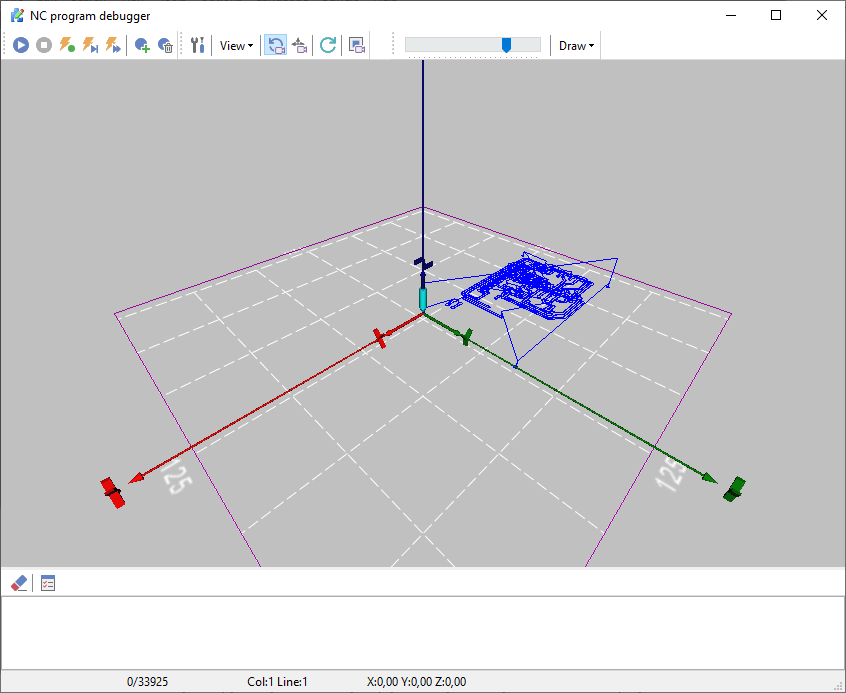
What you can check
- The tool path in 3D. Every move of the program is drawn, with clockwise (G02) and counterclockwise (G03) arcs, a grid and the axes of the scene and of the tool. Compare it with the part you expect before you run the program.
- The code next to the drawing. The current line is highlighted while the backplotter draws, and the status bar shows the X, Y and Z position, the line and the column.
- Step by step. Play, stop, step forward and step backward like a media player, set breakpoints to stop at the line you want to look at, and slow the simulation down with the speed slider.
- Any angle. Rotate, pan and zoom the 3D view with the mouse, or switch to the 2D XY, XZ and YZ views and back to 3D.
- Errors. The backplotter can pause when it meets an error in the program, and its message log records errors and the G codes you choose (G00, G01, G02 and others).
What the backplotter does not do
- It draws the tool path only. It does not show material being removed and does not simulate the machine, the fixture or collisions.
- It does not draw drilling cycles (G73 to G89) and does not run macros or variables.
- It has no separate settings for lathe programs, for example X as a diameter. Lathe programs are edited in the editor as usual.
For drilling cycles and for lathe programs with X as a diameter, use the free online G-code viewer: it draws drilling cycles as drill moves and has a lathe mode.
How to simulate a program
- Open the program in CNC Syntax Editor Enterprise.
- Start the backplotter. The program appears next to the 3D view.
- Set breakpoints on the lines you want to inspect, for example a tool change or the first cut of a new contour.
- Press Play, or step forward and backward one line at a time. Slow the speed down for complex moves.
- If a move goes somewhere it should not, correct the line in the editor and run the backplotter again.
The other tools of the editor help with the same job: renumber blocks, check for duplicate line numbers, find the X, Y and Z ranges of the program, shift, scale, mirror and rotate coordinates, and compare two versions of a program side by side.
Backplotter or online viewer?
| Backplotter in CNC Syntax Editor | Online G-code viewer | |
|---|---|---|
| Where it runs | Windows, also offline | any web browser |
| Editing | correct the code and run it again in the same editor | paste or open the program, edit it in the text box |
| Stepping | play, step forward and back, breakpoints, speed slider | play, step, slider |
| Checks | pause on error, message log | report: ranges, tools, feed rates, spindle, arcs, duplicate block numbers, cutting time |
| Drilling cycles (G73-G89) | not drawn | drawn as drill moves |
| Lathe programs | no separate lathe settings | lathe mode: X as a diameter, U and W |
| Material removal | no, tool path only | no, tool path only |
| Price | Enterprise edition | free |
For a quick look at a program from a colleague or a CAM system, use the free online G-code viewer. For daily work on programs, the backplotter keeps simulation and editing in one window.
Editions and trial
The backplotter is part of the Enterprise edition. The trial saves your work and has no 30-minute limit, so you can try the backplotter on your own programs; download it here. The Free Edition (programs up to 16 KB) and the Professional edition do not include the backplotter. Compare the editions.
Questions
Which edition of CNC Syntax Editor includes the backplotter? The Enterprise edition. The Professional and Free editions include the editor and its CNC tools, but not the backplotter.
Can I try the backplotter before I buy? Yes. Download the trial from the download page: it saves your work and has no 30-minute limit.
Does the backplotter show material removal? No. It draws the tool path only; it does not show material being removed and does not simulate the machine, the fixture or collisions.
Does the backplotter draw drilling cycles and macros? No. Drilling cycles (G73 to G89) and macros are not drawn. The free online G-code viewer draws drilling cycles G73 to G89 as drill moves; it does not run macros either.
Is there a free way to see a G-code tool path? Yes. The online G-code viewer draws the tool path in your browser, steps through the program and checks arcs, feed rates, spindle state, ranges and tools. The program is not uploaded.
M codes | G codes | G and M codes for mills | ISO tape codes | EIA tape codes | Online G-code viewer